Configure AWS PrivateLink
Set up AWS PrivateLink for secure connectivity to RAD Security
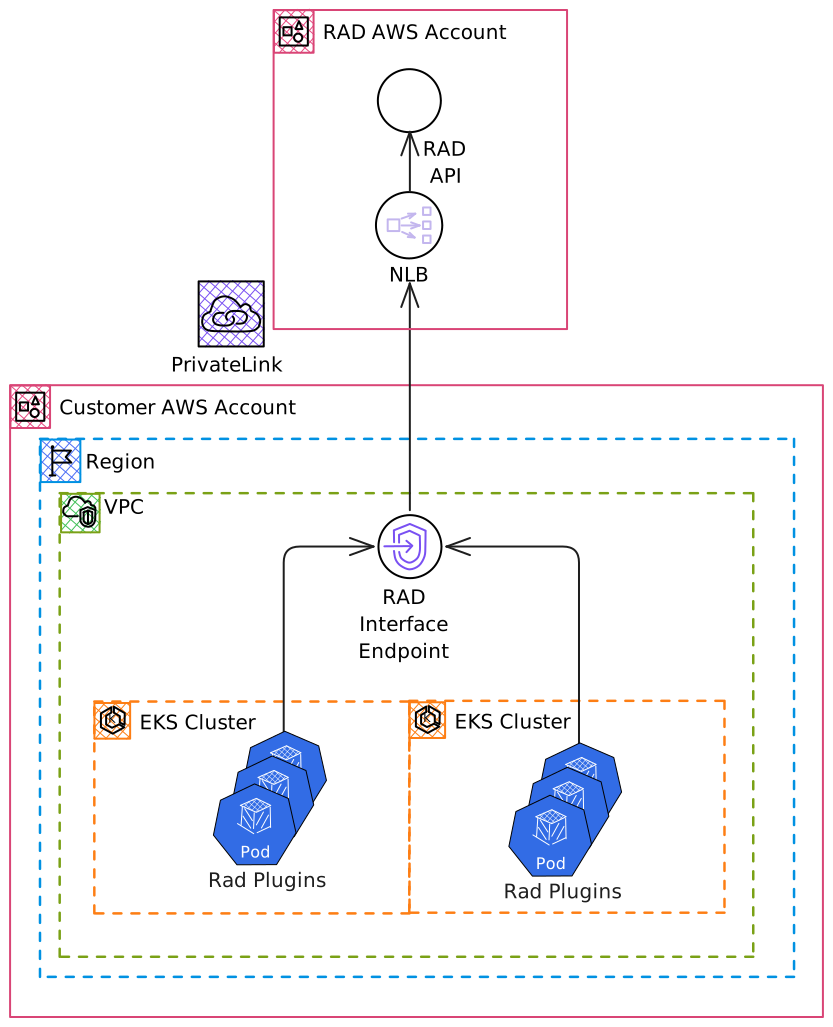
RAD provides AWS PrivateLink connectivity to enhance security and reduce data egress costs, enabling communication with the RAD Security platform without exposing traffic to the public internet.
Configuration Steps
Follow these five steps to setup an Interface Endpoint:
Step 1: Select Endpoint Type
Select Endpoint services that use NLBs and GWLBs
Step 2: Provide Service Name
Provide the Endpoint Service Name to create a new Interface Endpoint.
For regions other than us-west-2, enable Cross Region endpoint and select us-west-2.
Step 3: Select VPC
Choose your VPC for the Interface Endpoint installation.
Step 4: Configure DNS
Enable DNS Name to configure DNS for api.rad.security to point to the Interface Endpoint.
Step 5: Configure Security Groups
Configure security groups to allow traffic on port 443 to the Interface Endpoint.
RAD currently supports us-east-1, us-east-2, us-west-1, and us-west-2. Contact RAD for other supported regions.
Verification
After endpoint creation (takes a few minutes), Private DNS automatically routes api.rad.security traffic through your VPC Interface Endpoint. Monitor CloudWatch metrics for active connections and data transmission.
Troubleshooting
DNS Resolution Check
nslookup api.rad.security
Should return a private IP address, not a public one.
Connectivity Test
nc -vz api.rad.security 443
Should connect successfully if endpoint and security groups are configured correctly.