> ## Documentation Index
> Fetch the complete documentation index at: https://docs.rad.security/llms.txt
> Use this file to discover all available pages before exploring further.
# Pod Isolation Actions
> Terminate, quarantine, or label pods in a connected Kubernetes cluster from the RAD Security UI or API
## Overview
Pod isolation actions let you respond to a threat directly from RAD Security — without leaving the platform and without `kubectl` access to the cluster. When you create an action, RAD Security queues it for the cluster, and the `rad-sync` plugin already running in that cluster picks it up and applies the change through the Kubernetes API.
Three action types are available:
| Action type | What it does | Kubernetes operation |
| ------------------ | -------------------------------------------------------------------------------------------- | ------------------------------------------------------------------------- |
| `terminate_pod` | Permanently deletes the target pod | `DELETE` on `v1/pods` |
| `disable_outbound` | Quarantines the pod: applies quarantine labels and creates a deny-all-egress `NetworkPolicy` | `PATCH` on `v1/pods` + `CREATE` on `networking.k8s.io/v1/networkpolicies` |
| `label_pod` | Applies labels to the target pod | Merge-patch on `v1/pods` |
Actions are available both from the **Actions** tab of a cluster in the UI and from the [Cluster Actions API](#api-reference). Every action — whichever way it was created — is recorded with its author, timestamps, and execution result.
Actions target **pods**. To isolate a workload permanently, address the controller (Deployment, StatefulSet, DaemonSet) as well — see [Terminate Pod](#terminate-pod).
## Prerequisites
The cluster is connected to RAD Security and the **`sync` plugin is running and healthy**. The plugin status is shown on the **Overview** tab of the cluster details panel. See [Kubernetes Setup](/rad-security/integrations/kubernetes-setup) and [rad-sync](/rad-security/integrations/kubernetes-setup/rad-sync).
The `rad-sync` ClusterRole grants the permissions the actions require. The default Helm chart already includes them:
```yaml theme={null}
- apiGroups: [ "" ]
resources: [ "pods", "pods/log" ]
verbs: [ "get", "list", "delete", "update", "patch" ]
- apiGroups: [ "networking.k8s.io" ]
resources: [ "networkpolicies" ]
verbs: [ "create", "update", "get" ]
```
Your RAD Security user or access key has **modify** permission on the account. Listing and viewing actions requires **read** permission.
`disable_outbound` creates a Kubernetes `NetworkPolicy`. NetworkPolicies are only enforced if your cluster runs a CNI that implements them (Calico, Cilium, Weave Net, and most managed CNIs). With a CNI that ignores NetworkPolicies, the object is created successfully and the action reports `Executed`, but traffic is **not** blocked.
## How execution works
You submit an action from the UI or the API. RAD Security stores it with status `Pending` and returns an action ID in the form `ca-`.
The `rad-sync` plugin in the target cluster polls RAD Security for pending work. The default poll interval is **60 seconds** (`sync-interval`), so an action typically starts executing within a minute.
`rad-sync` applies the operation with the Kubernetes API using the cluster's own service account — RAD Security never connects inbound to your cluster.
`rad-sync` reports the outcome, and the action moves to `Executed` or `Failed`. The `result` field carries the message shown in the UI, for example `Resource default/nginx-new has been deleted`.
A failing action is retried on each sync cycle up to **5 times** (`max-sync-retries`). After that it is marked `Failed` with a result of `Max retries reached: 5. Last error: ...`.
### Action statuses
| Status | Meaning |
| ---------- | -------------------------------------------------------------- |
| `Pending` | Queued; not yet picked up or still being retried by `rad-sync` |
| `Executed` | Applied successfully in the cluster |
| `Failed` | Could not be applied — see `result` for the Kubernetes error |
## Using the UI
Open **Data Sources → Connections → Clusters**, select the cluster, and open the **Actions** tab.
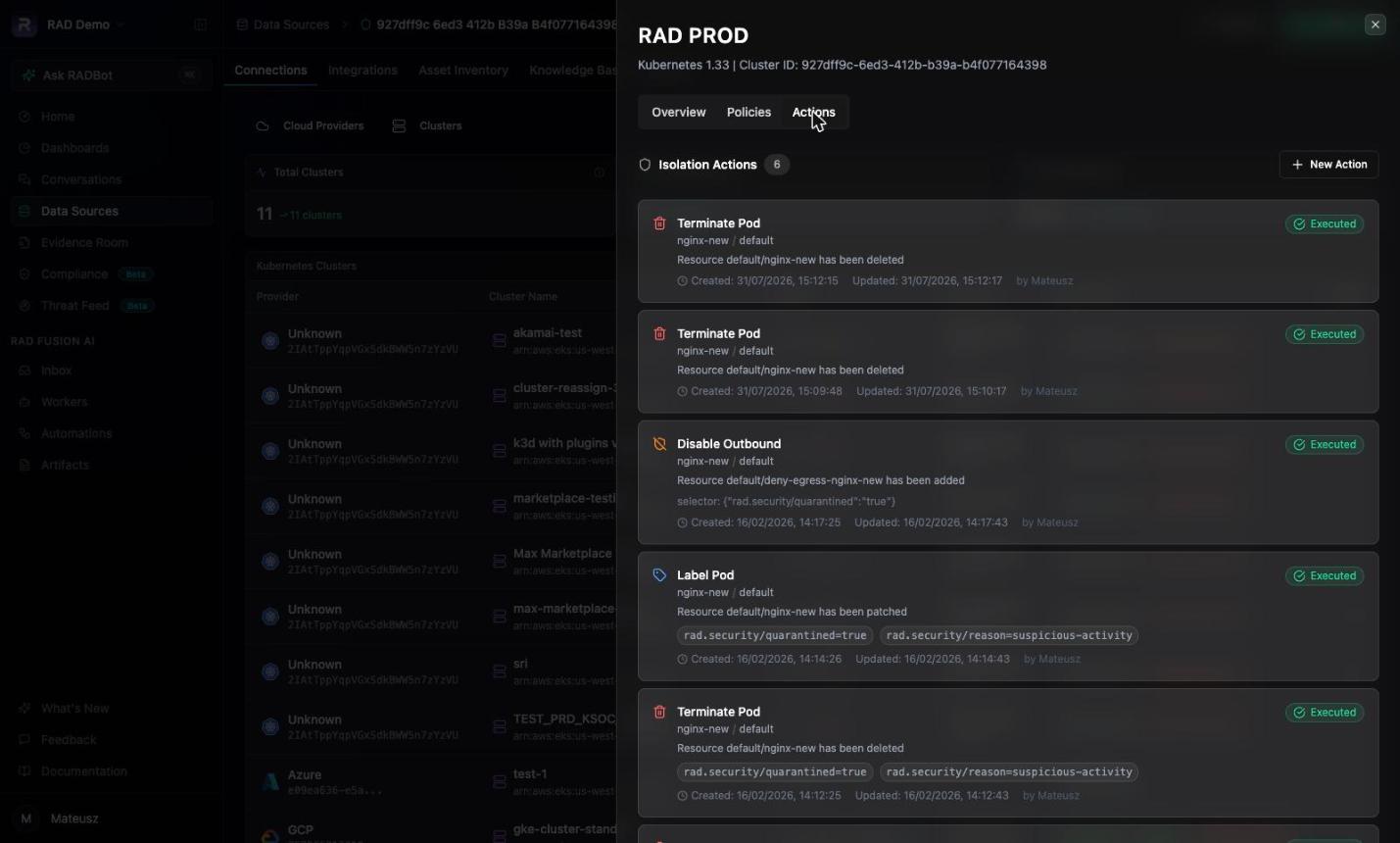 The tab lists every isolation action for the cluster, newest first, with its type, target pod and namespace, applied parameters, status, result message, timestamps, and the user who created it. While an action is pending, the list refreshes automatically every few seconds.
### Creating an action
Select **New Action** in the top right of the Actions tab.
The tab lists every isolation action for the cluster, newest first, with its type, target pod and namespace, applied parameters, status, result message, timestamps, and the user who created it. While an action is pending, the list refreshes automatically every few seconds.
### Creating an action
Select **New Action** in the top right of the Actions tab.
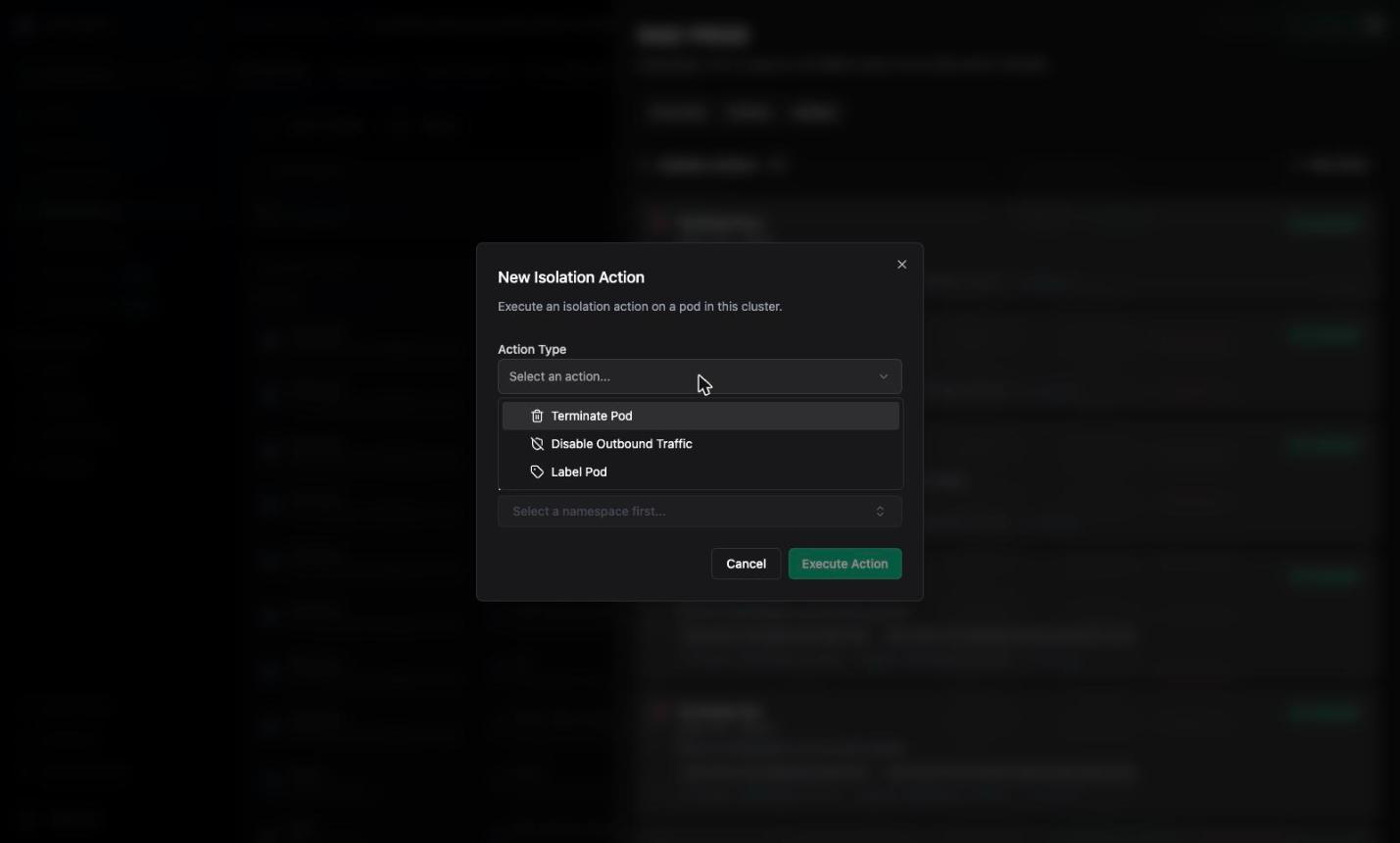
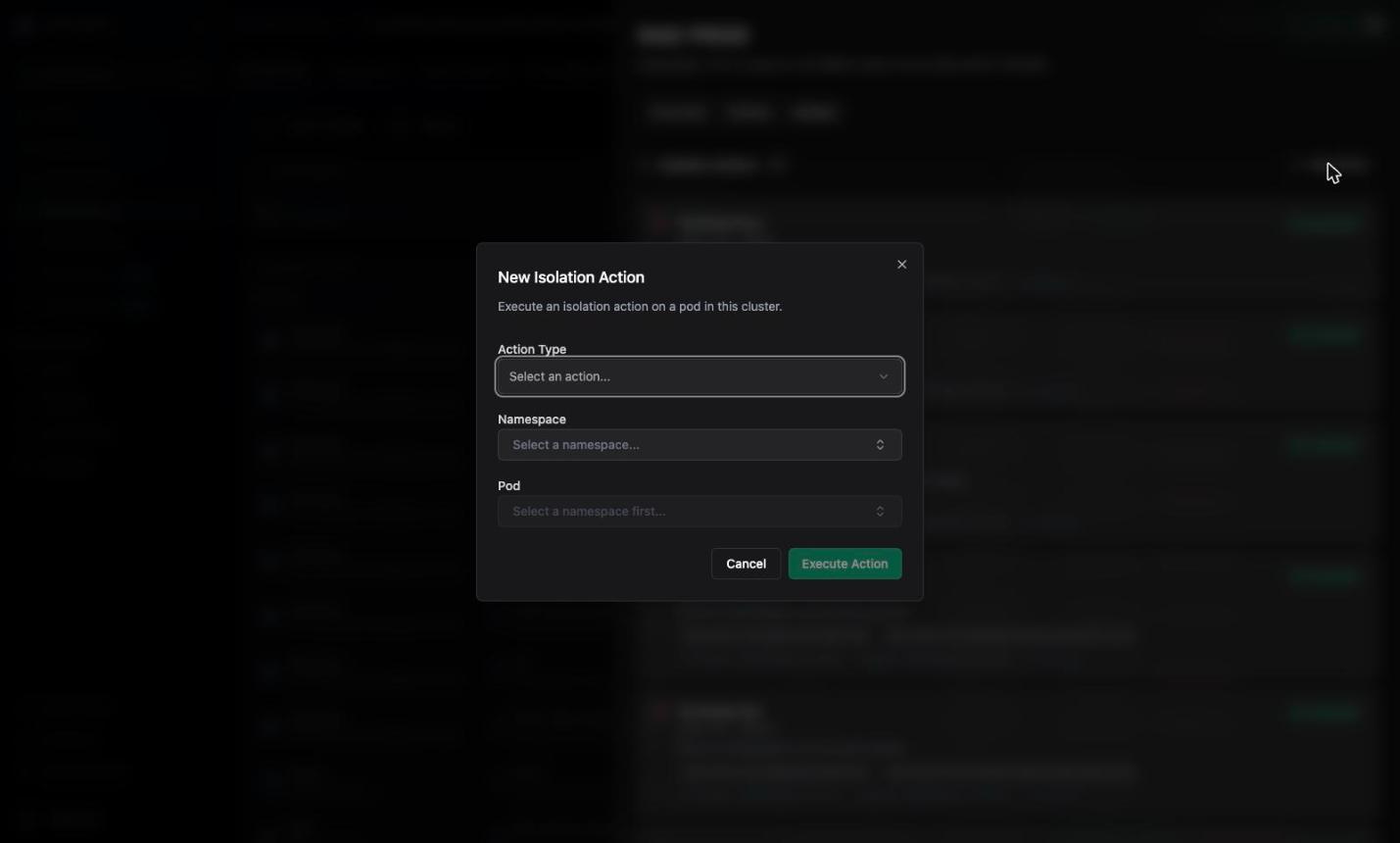 Pick **Terminate Pod**, **Disable Outbound Traffic**, or **Label Pod**. A short description of the selected action appears under the field.
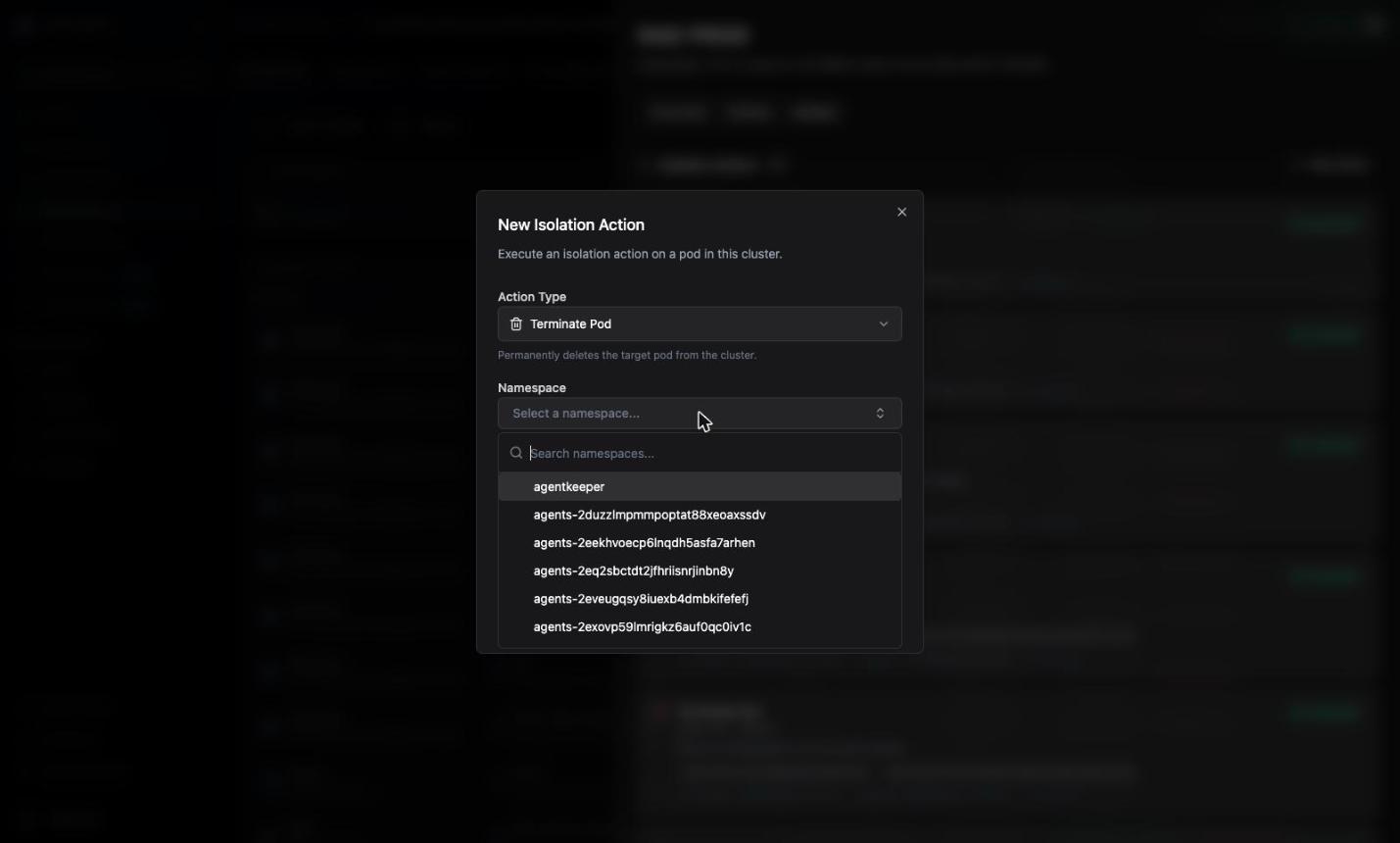
 Namespaces are loaded from the cluster inventory and can be filtered by typing.
 The pod list is scoped to the namespace you selected. Changing the namespace resets the pod selection.
For **Label Pod**, add one or more key/value pairs. Then confirm with the action button — **Terminate Pod**, **Disable Outbound**, or **Apply Labels**.
The new action appears in the list as `Pending` and updates to `Executed` or `Failed` on its own once `rad-sync` has processed it.
### Terminate Pod
The pod list is scoped to the namespace you selected. Changing the namespace resets the pod selection.
For **Label Pod**, add one or more key/value pairs. Then confirm with the action button — **Terminate Pod**, **Disable Outbound**, or **Apply Labels**.
The new action appears in the list as `Pending` and updates to `Executed` or `Failed` on its own once `rad-sync` has processed it.
### Terminate Pod
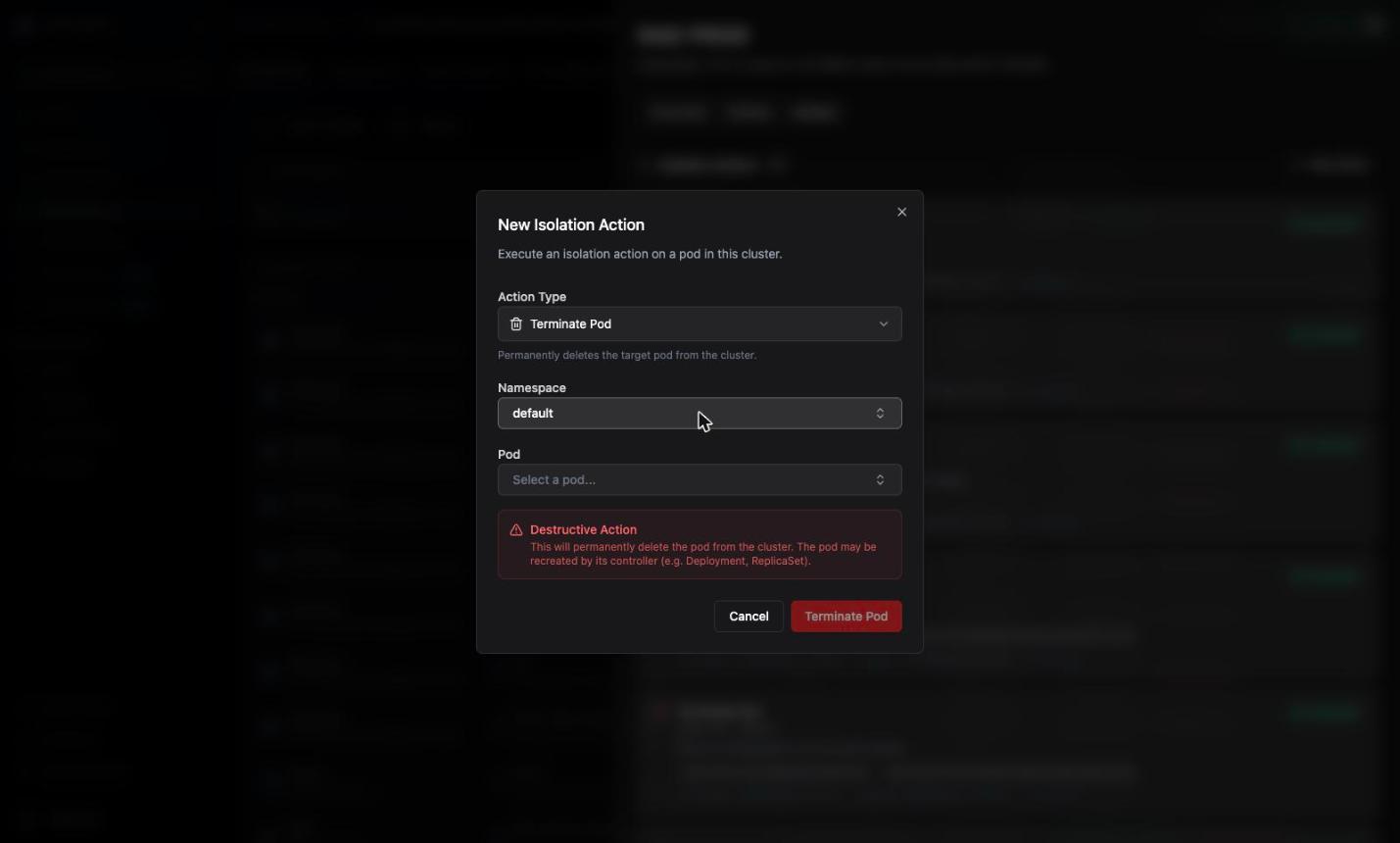 Deletes the pod from the cluster.
This is destructive and cannot be undone. If the pod is managed by a controller (Deployment, ReplicaSet, StatefulSet, DaemonSet), the controller **recreates it**, typically within seconds and with the same image. Use termination to kill a running process immediately, then follow up by scaling down or removing the controller.
### Disable Outbound Traffic
Deletes the pod from the cluster.
This is destructive and cannot be undone. If the pod is managed by a controller (Deployment, ReplicaSet, StatefulSet, DaemonSet), the controller **recreates it**, typically within seconds and with the same image. Use termination to kill a running process immediately, then follow up by scaling down or removing the controller.
### Disable Outbound Traffic
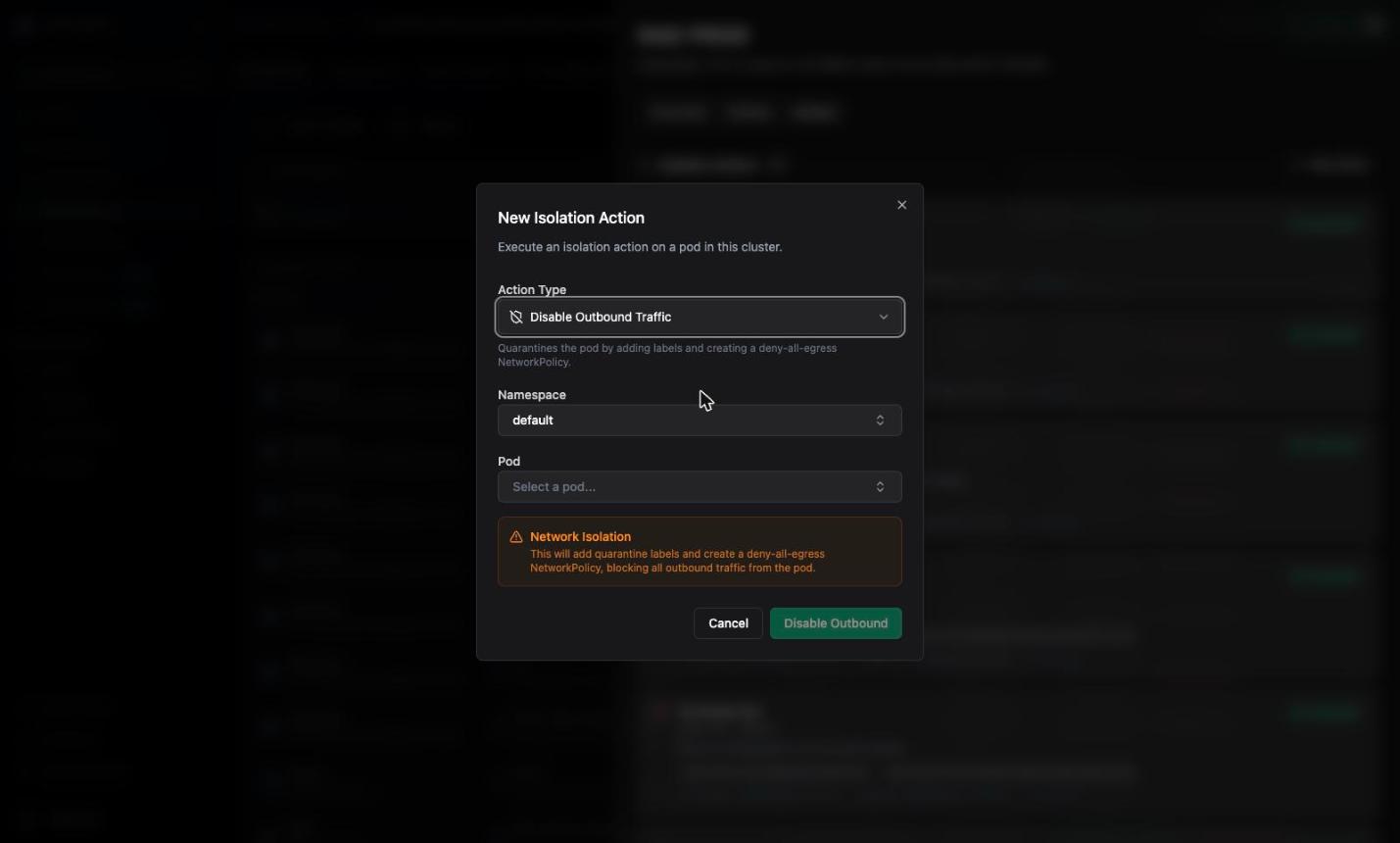 Quarantines the pod so it can no longer initiate outbound connections. A single request expands into **two** actions:
1. A `label_pod` action that applies the quarantine labels to the target pod:
```yaml theme={null}
rad.security/quarantined: "true"
rad.security/quarantine_id: ""
```
2. A `disable_outbound` action that creates a deny-all-egress `NetworkPolicy` named `deny-egress-` in the pod's namespace, selecting exactly those labels:
```yaml theme={null}
apiVersion: networking.k8s.io/v1
kind: NetworkPolicy
metadata:
name: deny-egress-
namespace:
annotations:
rad.security/created-by: rad-cluster-action
spec:
podSelector:
matchLabels:
rad.security/quarantined: "true"
rad.security/quarantine_id: ""
policyTypes:
- Egress
egress: []
```
Because the policy selects a unique `quarantine_id`, each quarantine is independent — quarantining a second pod in the same namespace does not widen or replace the first policy.
The quarantine follows the **labels**, not the pod. If the pod is deleted and its controller creates a replacement, the new pod has no quarantine labels and is not covered by the policy. Quarantine the replacement as well, or scale the controller down.
Ingress traffic is not affected. The policy sets `policyTypes: [Egress]` only, so existing connections into the pod and its Service continue to work. That is deliberate: it keeps the pod reachable for forensics while cutting off command-and-control and data exfiltration.
### Label Pod
Quarantines the pod so it can no longer initiate outbound connections. A single request expands into **two** actions:
1. A `label_pod` action that applies the quarantine labels to the target pod:
```yaml theme={null}
rad.security/quarantined: "true"
rad.security/quarantine_id: ""
```
2. A `disable_outbound` action that creates a deny-all-egress `NetworkPolicy` named `deny-egress-` in the pod's namespace, selecting exactly those labels:
```yaml theme={null}
apiVersion: networking.k8s.io/v1
kind: NetworkPolicy
metadata:
name: deny-egress-
namespace:
annotations:
rad.security/created-by: rad-cluster-action
spec:
podSelector:
matchLabels:
rad.security/quarantined: "true"
rad.security/quarantine_id: ""
policyTypes:
- Egress
egress: []
```
Because the policy selects a unique `quarantine_id`, each quarantine is independent — quarantining a second pod in the same namespace does not widen or replace the first policy.
The quarantine follows the **labels**, not the pod. If the pod is deleted and its controller creates a replacement, the new pod has no quarantine labels and is not covered by the policy. Quarantine the replacement as well, or scale the controller down.
Ingress traffic is not affected. The policy sets `policyTypes: [Egress]` only, so existing connections into the pod and its Service continue to work. That is deliberate: it keeps the pod reachable for forensics while cutting off command-and-control and data exfiltration.
### Label Pod
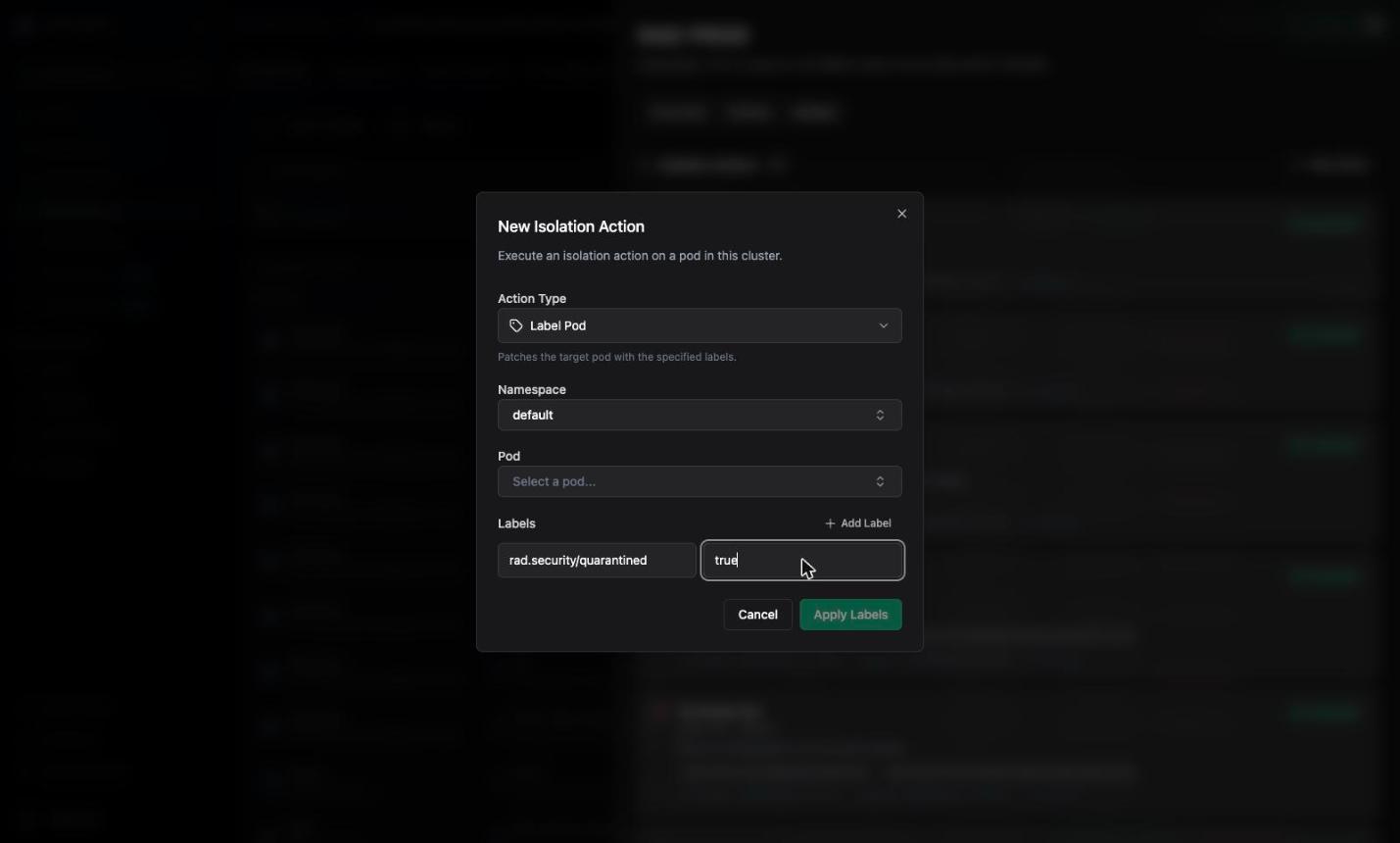 Merge-patches `metadata.labels` on the target pod. Existing labels that you do not name are left untouched.
Labels are useful to mark a pod for follow-up tooling — for example to make it selectable by your own NetworkPolicies, admission controls, or dashboards:
```yaml theme={null}
rad.security/quarantined: "true"
rad.security/reason: "suspicious-activity"
```
Keys and values must satisfy [Kubernetes label syntax](https://kubernetes.io/docs/concepts/overview/working-with-objects/labels/#syntax-and-character-set); invalid labels are rejected before the action is queued. See [Label validation rules](#label-validation-rules).
### Removing a quarantine
There is no "undo" action. To lift a quarantine, remove the objects in the cluster directly:
```bash theme={null}
# Remove the deny-all-egress policy
kubectl delete networkpolicy deny-egress- -n
# Remove the quarantine labels from the pod
kubectl label pod -n \
rad.security/quarantined- rad.security/quarantine_id-
```
The `quarantine_id` is shown on the action entry in the Actions tab and returned in the action's `parameters`.
## API reference
All endpoints are served from `https://api.rad.security`.
### Authentication
Create an access key in **Settings → Access Keys**, exchange it for a session token, and send the token as a bearer token. See [Managing API Keys](/rad-security/platform/tutorials/managing-api-keys).
```bash theme={null}
TOKEN=$(curl -s 'https://api.rad.security/authentication/authenticate' \
-d '{"access_key_id":"","secret_key":""}' | jq -r .token)
```
### Create actions
```
POST /accounts/{account_id}/clusters/{cluster_id}/actions
```
The request body is an **array**, so several actions can be queued in one call. Returns `201 Created` with the created actions.
```bash Terminate a pod theme={null}
curl -X POST \
"https://api.rad.security/accounts/$ACCOUNT_ID/clusters/$CLUSTER_ID/actions" \
-H "Authorization: Bearer $TOKEN" \
-H "Content-Type: application/json" \
-d '[
{
"action_type": "terminate_pod",
"target_pod_name": "nginx-new",
"target_namespace": "default"
}
]'
```
```bash Disable outbound traffic theme={null}
curl -X POST \
"https://api.rad.security/accounts/$ACCOUNT_ID/clusters/$CLUSTER_ID/actions" \
-H "Authorization: Bearer $TOKEN" \
-H "Content-Type: application/json" \
-d '[
{
"action_type": "disable_outbound",
"target_pod_name": "nginx-new",
"target_namespace": "default"
}
]'
```
```bash Label a pod theme={null}
curl -X POST \
"https://api.rad.security/accounts/$ACCOUNT_ID/clusters/$CLUSTER_ID/actions" \
-H "Authorization: Bearer $TOKEN" \
-H "Content-Type: application/json" \
-d '[
{
"action_type": "label_pod",
"target_pod_name": "nginx-new",
"target_namespace": "default",
"parameters": {
"labels": {
"rad.security/quarantined": "true",
"rad.security/reason": "suspicious-activity"
}
}
}
]'
```
```bash Batch theme={null}
curl -X POST \
"https://api.rad.security/accounts/$ACCOUNT_ID/clusters/$CLUSTER_ID/actions" \
-H "Authorization: Bearer $TOKEN" \
-H "Content-Type: application/json" \
-d '[
{
"action_type": "label_pod",
"target_pod_name": "api-7d9f",
"target_namespace": "payments",
"parameters": { "labels": { "rad.security/reason": "triage" } }
},
{
"action_type": "disable_outbound",
"target_pod_name": "api-7d9f",
"target_namespace": "payments"
}
]'
```
#### Request fields
| Field | Type | Required | Description |
| ------------------ | ------ | --------------- | ------------------------------------------------------------------------------------------------------------- |
| `action_type` | string | yes | `terminate_pod`, `disable_outbound`, or `label_pod` |
| `target_pod_name` | string | yes | Name of the pod to act on |
| `target_namespace` | string | yes | Namespace of the pod |
| `parameters` | object | for `label_pod` | Action parameters. `label_pod` requires `parameters.labels` — a non-empty map of string keys to string values |
#### Response
```json theme={null}
[
{
"id": "ca-2rF9xQ8mS1kLp7vTn3JcYwZ0aBd",
"cluster_id": "927dff9c-6ed3-412b-b39a-b4f077164398",
"account_id": "2IAtTppYqpVGxSdkBWW5n7zYzVU",
"action_type": "terminate_pod",
"status": "Pending",
"target_pod_name": "nginx-new",
"target_namespace": "default",
"parameters": {},
"created_by": "b1f1c6d2-8f5a-4a0e-9d3e-1c2f4a6b8d0e",
"created_at": "2026-07-31T15:12:15.482Z",
"updated_at": "2026-07-31T15:12:15.482Z"
}
]
```
A single `disable_outbound` request returns **two** action objects — the `label_pod` action that applies the quarantine labels and the `disable_outbound` action that creates the NetworkPolicy. Both must reach `Executed` for the pod to be quarantined. The generated `quarantine_id` is in the `parameters` of both.
### List actions
```
GET /accounts/{account_id}/clusters/{cluster_id}/actions
```
Returns every action for the cluster, newest first.
```bash theme={null}
curl "https://api.rad.security/accounts/$ACCOUNT_ID/clusters/$CLUSTER_ID/actions" \
-H "Authorization: Bearer $TOKEN" | jq .
```
```json theme={null}
{
"entries": [
{
"id": "ca-2rF9xQ8mS1kLp7vTn3JcYwZ0aBd",
"cluster_id": "927dff9c-6ed3-412b-b39a-b4f077164398",
"account_id": "2IAtTppYqpVGxSdkBWW5n7zYzVU",
"action_type": "terminate_pod",
"status": "Executed",
"target_pod_name": "nginx-new",
"target_namespace": "default",
"parameters": {},
"result": "Resource default/nginx-new has been deleted",
"created_by": "b1f1c6d2-8f5a-4a0e-9d3e-1c2f4a6b8d0e",
"created_at": "2026-07-31T15:12:15.482Z",
"updated_at": "2026-07-31T15:12:17.913Z"
}
],
"page_count": 1,
"total_count": 1,
"page": 1,
"page_size": 1
}
```
### Get an action
```
GET /accounts/{account_id}/clusters/{cluster_id}/actions/{action_id}
```
Use this to poll a single action until it leaves `Pending`.
```bash theme={null}
curl "https://api.rad.security/accounts/$ACCOUNT_ID/clusters/$CLUSTER_ID/actions/$ACTION_ID" \
-H "Authorization: Bearer $TOKEN" | jq '.status, .result'
```
### Action object
| Field | Type | Description |
| ------------------ | ------ | ------------------------------------------------------------------------------------ |
| `id` | string | Action ID, prefixed with `ca-` |
| `cluster_id` | string | Target cluster |
| `account_id` | string | Owning account |
| `action_type` | string | `terminate_pod`, `disable_outbound`, or `label_pod` |
| `status` | string | `Pending`, `Executed`, or `Failed` |
| `target_pod_name` | string | Pod the action was created for |
| `target_namespace` | string | Namespace of the pod |
| `parameters` | object | Action parameters — `labels` for `label_pod`, `quarantine_id` for `disable_outbound` |
| `result` | string | Message reported by `rad-sync` after execution; the Kubernetes error when `Failed` |
| `created_by` | string | Identity that created the action |
| `created_at` | string | RFC 3339 timestamp |
| `updated_at` | string | RFC 3339 timestamp of the last status change |
### Validation rules
Requests are validated before anything is queued. A rejected request returns `400` and creates no actions — including the other entries in the same batch.
| Condition | Error |
| --------------------------------------------- | -------------------------------------------------------------------------------- |
| Unknown `action_type` | `invalid action_type: must be one of terminate_pod, disable_outbound, label_pod` |
| Missing `target_pod_name` | Invalid input on field `target_pod_name` |
| Missing `target_namespace` | Invalid input on field `target_namespace` |
| `label_pod` without `parameters.labels` | Invalid input on field `parameters.labels` |
| Non-string label value | Invalid input on field `parameters.labels.` |
| Label key or value breaking Kubernetes syntax | Invalid input describing the offending key |
Validation does not check that the pod exists. An action targeting a missing pod is accepted, then reported as `Failed` by `rad-sync` with the Kubernetes "not found" error.
#### Label validation rules
| Element | Rule |
| --------------------------------- | -------------------------------------------------------------------------------------- |
| Key name segment | 1–63 characters; alphanumerics, `-`, `_`, `.`; must start and end with an alphanumeric |
| Key prefix (optional, before `/`) | Valid DNS subdomain, at most 253 characters — for example `rad.security/quarantined` |
| Value | At most 63 characters, same character set as the key name segment; may be empty |
| Label map | Must contain at least one entry |
## Troubleshooting
The cluster has not picked it up yet. Check the **Overview** tab of the cluster details panel: the `sync` plugin must be listed and healthy, and the cluster's **Last seen** timestamp should be recent.
The default poll interval is 60 seconds, so allow at least a minute. If the plugin is not running, or the cluster has lost connectivity to `api.rad.security` on port 443, actions queue up and execute once it reconnects.
The pod no longer exists under that name in that namespace — it was already deleted, or it is controller-managed and was recreated with a new name. Refresh the pod list and create the action against the current pod name.
The `rad-sync` service account is missing the RBAC permission for the operation. Confirm the `rad-sync` ClusterRole grants `delete`/`patch` on `pods` and `create` on `networkpolicies` (see [Prerequisites](#prerequisites)), and upgrade the `rad-plugins` Helm release if the chart predates these rules.
The NetworkPolicy was created, but nothing enforces it. Verify your CNI implements NetworkPolicy, then confirm the policy and the pod labels line up:
```bash theme={null}
kubectl get networkpolicy deny-egress- -n -o yaml
kubectl get pod -n --show-labels
```
Both quarantine labels must be present on the pod. If the `label_pod` half of the pair failed, the policy selects nothing.
Expected when a controller owns the pod. Terminating a pod stops the running process; the Deployment or ReplicaSet then schedules a replacement. Scale the controller to zero, or delete it, to keep the workload down.
Session tokens are short-lived — re-authenticate to get a fresh token. Creating actions requires **modify** permission on the account; listing them requires **read**.
## Next Steps
Connect a cluster and install the RAD plugins.
The plugin that applies isolation actions in your cluster.
Create the access key used to call the Cluster Actions API.
Detect the behavior that warrants an isolation action.
Merge-patches `metadata.labels` on the target pod. Existing labels that you do not name are left untouched.
Labels are useful to mark a pod for follow-up tooling — for example to make it selectable by your own NetworkPolicies, admission controls, or dashboards:
```yaml theme={null}
rad.security/quarantined: "true"
rad.security/reason: "suspicious-activity"
```
Keys and values must satisfy [Kubernetes label syntax](https://kubernetes.io/docs/concepts/overview/working-with-objects/labels/#syntax-and-character-set); invalid labels are rejected before the action is queued. See [Label validation rules](#label-validation-rules).
### Removing a quarantine
There is no "undo" action. To lift a quarantine, remove the objects in the cluster directly:
```bash theme={null}
# Remove the deny-all-egress policy
kubectl delete networkpolicy deny-egress- -n
# Remove the quarantine labels from the pod
kubectl label pod -n \
rad.security/quarantined- rad.security/quarantine_id-
```
The `quarantine_id` is shown on the action entry in the Actions tab and returned in the action's `parameters`.
## API reference
All endpoints are served from `https://api.rad.security`.
### Authentication
Create an access key in **Settings → Access Keys**, exchange it for a session token, and send the token as a bearer token. See [Managing API Keys](/rad-security/platform/tutorials/managing-api-keys).
```bash theme={null}
TOKEN=$(curl -s 'https://api.rad.security/authentication/authenticate' \
-d '{"access_key_id":"","secret_key":""}' | jq -r .token)
```
### Create actions
```
POST /accounts/{account_id}/clusters/{cluster_id}/actions
```
The request body is an **array**, so several actions can be queued in one call. Returns `201 Created` with the created actions.
```bash Terminate a pod theme={null}
curl -X POST \
"https://api.rad.security/accounts/$ACCOUNT_ID/clusters/$CLUSTER_ID/actions" \
-H "Authorization: Bearer $TOKEN" \
-H "Content-Type: application/json" \
-d '[
{
"action_type": "terminate_pod",
"target_pod_name": "nginx-new",
"target_namespace": "default"
}
]'
```
```bash Disable outbound traffic theme={null}
curl -X POST \
"https://api.rad.security/accounts/$ACCOUNT_ID/clusters/$CLUSTER_ID/actions" \
-H "Authorization: Bearer $TOKEN" \
-H "Content-Type: application/json" \
-d '[
{
"action_type": "disable_outbound",
"target_pod_name": "nginx-new",
"target_namespace": "default"
}
]'
```
```bash Label a pod theme={null}
curl -X POST \
"https://api.rad.security/accounts/$ACCOUNT_ID/clusters/$CLUSTER_ID/actions" \
-H "Authorization: Bearer $TOKEN" \
-H "Content-Type: application/json" \
-d '[
{
"action_type": "label_pod",
"target_pod_name": "nginx-new",
"target_namespace": "default",
"parameters": {
"labels": {
"rad.security/quarantined": "true",
"rad.security/reason": "suspicious-activity"
}
}
}
]'
```
```bash Batch theme={null}
curl -X POST \
"https://api.rad.security/accounts/$ACCOUNT_ID/clusters/$CLUSTER_ID/actions" \
-H "Authorization: Bearer $TOKEN" \
-H "Content-Type: application/json" \
-d '[
{
"action_type": "label_pod",
"target_pod_name": "api-7d9f",
"target_namespace": "payments",
"parameters": { "labels": { "rad.security/reason": "triage" } }
},
{
"action_type": "disable_outbound",
"target_pod_name": "api-7d9f",
"target_namespace": "payments"
}
]'
```
#### Request fields
| Field | Type | Required | Description |
| ------------------ | ------ | --------------- | ------------------------------------------------------------------------------------------------------------- |
| `action_type` | string | yes | `terminate_pod`, `disable_outbound`, or `label_pod` |
| `target_pod_name` | string | yes | Name of the pod to act on |
| `target_namespace` | string | yes | Namespace of the pod |
| `parameters` | object | for `label_pod` | Action parameters. `label_pod` requires `parameters.labels` — a non-empty map of string keys to string values |
#### Response
```json theme={null}
[
{
"id": "ca-2rF9xQ8mS1kLp7vTn3JcYwZ0aBd",
"cluster_id": "927dff9c-6ed3-412b-b39a-b4f077164398",
"account_id": "2IAtTppYqpVGxSdkBWW5n7zYzVU",
"action_type": "terminate_pod",
"status": "Pending",
"target_pod_name": "nginx-new",
"target_namespace": "default",
"parameters": {},
"created_by": "b1f1c6d2-8f5a-4a0e-9d3e-1c2f4a6b8d0e",
"created_at": "2026-07-31T15:12:15.482Z",
"updated_at": "2026-07-31T15:12:15.482Z"
}
]
```
A single `disable_outbound` request returns **two** action objects — the `label_pod` action that applies the quarantine labels and the `disable_outbound` action that creates the NetworkPolicy. Both must reach `Executed` for the pod to be quarantined. The generated `quarantine_id` is in the `parameters` of both.
### List actions
```
GET /accounts/{account_id}/clusters/{cluster_id}/actions
```
Returns every action for the cluster, newest first.
```bash theme={null}
curl "https://api.rad.security/accounts/$ACCOUNT_ID/clusters/$CLUSTER_ID/actions" \
-H "Authorization: Bearer $TOKEN" | jq .
```
```json theme={null}
{
"entries": [
{
"id": "ca-2rF9xQ8mS1kLp7vTn3JcYwZ0aBd",
"cluster_id": "927dff9c-6ed3-412b-b39a-b4f077164398",
"account_id": "2IAtTppYqpVGxSdkBWW5n7zYzVU",
"action_type": "terminate_pod",
"status": "Executed",
"target_pod_name": "nginx-new",
"target_namespace": "default",
"parameters": {},
"result": "Resource default/nginx-new has been deleted",
"created_by": "b1f1c6d2-8f5a-4a0e-9d3e-1c2f4a6b8d0e",
"created_at": "2026-07-31T15:12:15.482Z",
"updated_at": "2026-07-31T15:12:17.913Z"
}
],
"page_count": 1,
"total_count": 1,
"page": 1,
"page_size": 1
}
```
### Get an action
```
GET /accounts/{account_id}/clusters/{cluster_id}/actions/{action_id}
```
Use this to poll a single action until it leaves `Pending`.
```bash theme={null}
curl "https://api.rad.security/accounts/$ACCOUNT_ID/clusters/$CLUSTER_ID/actions/$ACTION_ID" \
-H "Authorization: Bearer $TOKEN" | jq '.status, .result'
```
### Action object
| Field | Type | Description |
| ------------------ | ------ | ------------------------------------------------------------------------------------ |
| `id` | string | Action ID, prefixed with `ca-` |
| `cluster_id` | string | Target cluster |
| `account_id` | string | Owning account |
| `action_type` | string | `terminate_pod`, `disable_outbound`, or `label_pod` |
| `status` | string | `Pending`, `Executed`, or `Failed` |
| `target_pod_name` | string | Pod the action was created for |
| `target_namespace` | string | Namespace of the pod |
| `parameters` | object | Action parameters — `labels` for `label_pod`, `quarantine_id` for `disable_outbound` |
| `result` | string | Message reported by `rad-sync` after execution; the Kubernetes error when `Failed` |
| `created_by` | string | Identity that created the action |
| `created_at` | string | RFC 3339 timestamp |
| `updated_at` | string | RFC 3339 timestamp of the last status change |
### Validation rules
Requests are validated before anything is queued. A rejected request returns `400` and creates no actions — including the other entries in the same batch.
| Condition | Error |
| --------------------------------------------- | -------------------------------------------------------------------------------- |
| Unknown `action_type` | `invalid action_type: must be one of terminate_pod, disable_outbound, label_pod` |
| Missing `target_pod_name` | Invalid input on field `target_pod_name` |
| Missing `target_namespace` | Invalid input on field `target_namespace` |
| `label_pod` without `parameters.labels` | Invalid input on field `parameters.labels` |
| Non-string label value | Invalid input on field `parameters.labels.` |
| Label key or value breaking Kubernetes syntax | Invalid input describing the offending key |
Validation does not check that the pod exists. An action targeting a missing pod is accepted, then reported as `Failed` by `rad-sync` with the Kubernetes "not found" error.
#### Label validation rules
| Element | Rule |
| --------------------------------- | -------------------------------------------------------------------------------------- |
| Key name segment | 1–63 characters; alphanumerics, `-`, `_`, `.`; must start and end with an alphanumeric |
| Key prefix (optional, before `/`) | Valid DNS subdomain, at most 253 characters — for example `rad.security/quarantined` |
| Value | At most 63 characters, same character set as the key name segment; may be empty |
| Label map | Must contain at least one entry |
## Troubleshooting
The cluster has not picked it up yet. Check the **Overview** tab of the cluster details panel: the `sync` plugin must be listed and healthy, and the cluster's **Last seen** timestamp should be recent.
The default poll interval is 60 seconds, so allow at least a minute. If the plugin is not running, or the cluster has lost connectivity to `api.rad.security` on port 443, actions queue up and execute once it reconnects.
The pod no longer exists under that name in that namespace — it was already deleted, or it is controller-managed and was recreated with a new name. Refresh the pod list and create the action against the current pod name.
The `rad-sync` service account is missing the RBAC permission for the operation. Confirm the `rad-sync` ClusterRole grants `delete`/`patch` on `pods` and `create` on `networkpolicies` (see [Prerequisites](#prerequisites)), and upgrade the `rad-plugins` Helm release if the chart predates these rules.
The NetworkPolicy was created, but nothing enforces it. Verify your CNI implements NetworkPolicy, then confirm the policy and the pod labels line up:
```bash theme={null}
kubectl get networkpolicy deny-egress- -n -o yaml
kubectl get pod -n --show-labels
```
Both quarantine labels must be present on the pod. If the `label_pod` half of the pair failed, the policy selects nothing.
Expected when a controller owns the pod. Terminating a pod stops the running process; the Deployment or ReplicaSet then schedules a replacement. Scale the controller to zero, or delete it, to keep the workload down.
Session tokens are short-lived — re-authenticate to get a fresh token. Creating actions requires **modify** permission on the account; listing them requires **read**.
## Next Steps
Connect a cluster and install the RAD plugins.
The plugin that applies isolation actions in your cluster.
Create the access key used to call the Cluster Actions API.
Detect the behavior that warrants an isolation action.